
이렇게 팝업 형태로 뜨는 UI는 개별 Canvas를 적용한 다음 prefab화 하여 DontDestroyOnLoad를 적용한다.
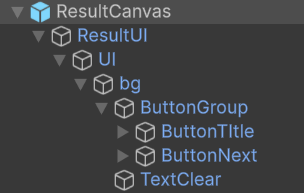
(ResultUI.cs)
using UnityEngine;
using UnityEngine.UI;
public class ResultUI : MonoBehaviour
{
[SerializeField] private GameObject UI;
[SerializeField] private Button gotoTitle;
[SerializeField] private Button nextStage;
void Awake()
{
DontDestroyOnLoad(this);
}
void Start()
{
InitButton();
}
private void InitButton()
{
gotoTitle.onClick.AddListener(GotoTitle);
nextStage.onClick.AddListener(NextStage);
}
private void GotoTitle()
{
//...
}
private void NextStage()
{
//...
}
}
DontDestroyOnLoad는 씬 이동 과정에서 해당 오브젝트가 파괴되지 않게 하여 canvas같이 비용이 큰 오브젝트를 재사용할 수 있게 해준다.
region문법을 사용해 Unity 내에서 켜고 끄는 기능을 추가한다.
#region Visibility
public void Show() => UI.SetActive(true);
public void Hide() => UI.SetActive(false);
#endregion
'유니티' 카테고리의 다른 글
| [유니티] 저장 (0) | 2026.05.13 |
|---|---|
| [유니티] UI 리스트 구현 (0) | 2026.05.13 |
| [유니티] Canvas and UI (0) | 2026.05.13 |
| [유니티] Audio Source (0) | 2026.05.12 |
| [유니티] Prefabs (0) | 2026.05.12 |